
While catching errors before they hit production is ideal, some of them, such as network errors, might slip through testing and impact your users.
If your React components are not properly catching errors thrown by third-party libraries or React hooks, such errors either end-up crashing the React lifecycle or reaching the top-level of the main execution thread, resulting in the “white screen” scenario:
As of React 16, errors that were not caught [...] will result in unmounting of the whole React component tree
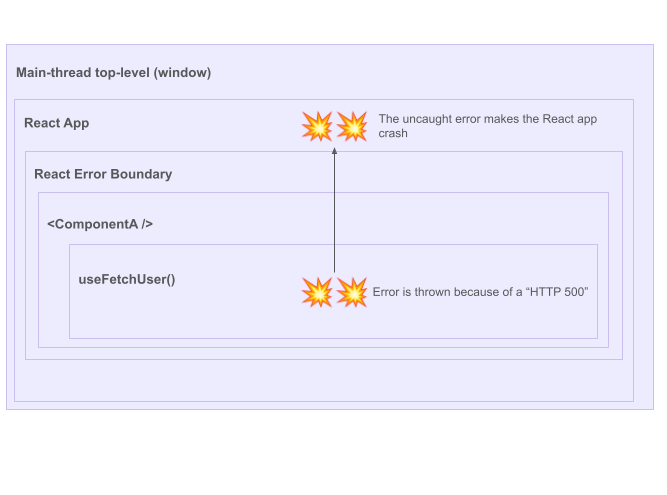
It is crucial that your application gracefully handle such errors by providing proper visual feedback and potential actions (ex: retry mechanisms).
Fortunately, implementing such UX patterns can be achieved with little work with the React API and, for the most advanced UX, with the help of lightweight React libraries.
Using JavaScript’s try-catch around React hooks calls won’t work due to the asynchronous nature of their execution. However, React API offers the Error boundaries mechanism to catch all types of errors that might “bubble out” from a component.
For example, if the
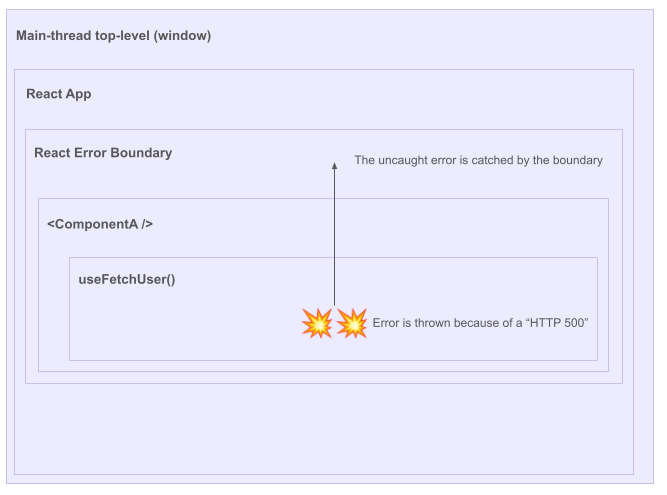
This article will cover how to implement Error Boundaries in your application, from simple error catching to displaying visual feedback and providing retry mechanisms.
Behind its sophisticated name, an Error Boundary is just a plain class React component implementing the componentDidCatch(error) method:
Note: React is not yet offering a hook-based alternative to implement error boundaries.
As showcased in this CodeSandbox, the componentDidCatch() class method will be called as soon as an error reaches our MyErrorBoundary component, allowing us to prevent the React app from crashing and forwarding the error to our error reporting tool. (The CodeSandbox might display a development error overlay that only shows in development, you can dismiss it to see the rendering result).
Let’s make our
class ErrorBoundarySimple extends React.Component {
  state = { hasError: false };

  componentDidCatch(error: unknown) {
    // report the error to your favorite Error Tracking tool (ex: Sentry, Bugsnag)
    console.error(error);
  }

  static getDerivedStateFromError(error: unknown) {
    // Update state so the next render will show the fallback UI.
    return { hasError: true };
  }

  render() {
    if (this.state.hasError) {
      return <p>Failed to fetch users.</p>;
    }

    return {this.props.children};
  }
}
With the above setup, any error in the
With a few lines of code, we just greatly improved our user experience by gracefully handling errors in our application.
However, such simple Error Boundaries implementations do have limitations. First, according to the React documentation, Error boundaries do not catch errors for:
And, the previously showcased Error Boundaries do not provide any action to the user to recover from the error, for example, with a retry mechanism. In the next section, we will see how to leverage the react-error-boundary library to handle all these edge cases.
Let’s now provide a superior error handling user experience by catching all kinds of errors and exposing recovery actions to the users. For this, we will use the react-error-boundary library which can be installed as follows:
npm install --save react-error-boundary

yarn add react-error-boundary
Our new CodeSandbox defines a
Let’s use react-error-boundary to properly catch errors and provide a retry mechanism:
import { ErrorBoundary, FallbackProps } from "react-error-boundary";
import { Users } from "./Users";

function ErrorFallback({ error, resetErrorBoundary }: FallbackProps) {
  return (
    <div role="alert">
      <p>Failed to load users:</p>
      <pre>{error.message}</pre>
      <button onClick={resetErrorBoundary}>Try again</button>
    </div>
  );
}

export default function App(): JSX.Element {
  return (
    <div className="App">
      <h1>Hello CodeSandbox</h1>
      <h2>Start editing to see some magic happen!</h2>
      <ErrorBoundary FallbackComponent={ErrorFallback}>
        {/* Users will fail to load 50% of the time */}
        <Users />
      </ErrorBoundary>
    </div>
  );
}
An ononError prop can also be provided to forward the error to your favorite error reporting tool (ex: Sentry). The react-error-boundary documentation showcases how to leverage other props (ex: onReset=) to handle more advanced scenarios.
As aforementioned, Error boundaries do not catch errors for:
Because such errors happen outside of the React rendering lifecycle, Error boundaries won’t be invoked. Again, react-error-boundary has us covered by providing a handleError() hook that helps with catching event-related and asynchronous errors.
import { useErrorHandler } from 'react-error-boundary'

function Greeting() {
  const [greeting, setGreeting] = React.useState(null)
  const handleError = useErrorHandler()

  function handleSubmit(event) {
    event.preventDefault()
    const name = event.target.elements.name.value
    fetchGreeting(name).then(
      newGreeting => setGreeting(newGreeting),
      error => handleError(error),
    )
  }

  return greeting ? (
    <div>{greeting}</div>
  ) : (
    <form onSubmit={handleSubmit}>
      <label>Name</label>
      <input id="name" />
      <button type="submit">get a greeting</button>
    </form>
  )
}
Errors happening inside of handleSubmit() function won’t be caught by React rendering lifecycle. For this reason, we use the handleError function provided by react-error-boundary’s useErrorHandler() to rethrow the error in the React lifecycle so that the nearest ErrorBoundary can catch it.
Behind its sophisticated name, a React Error Boundary is a straightforward way to gracefully handle any kind of error in a React application.
Good products should prevent errors from reaching production but also should use error boundaries to provide contextual feedback and recovery actions to their users in case of unexpected errors.
Meticulous creates and maintains an exhaustive suite of e2e ui tests with zero developer effort.
This quote from the CTO of Traba sums the product up best: "Meticulous has fundamentally changed the way we approach frontend testing in our web applications, fully eliminating the need to write any frontend tests. The software gives us confidence that every change will be completely regression tested, allowing us to ship more quickly with significantly fewer bugs in our code. The platform is easy to use and reduces the barrier to entry for backend-focused devs to contribute to our frontend codebase."
This post from our CTO (formerly lead of Palantir's main engineering group) sets out the context of why exhaustive testing can double engineering velocity. Learn more about the product here.

Meticulous creates and maintains an exhaustive suite of end-to-end UI tests with zero developer effort. Learn more here.


